Weekly Smoke Testing
How AI Elevates WeeklySmokeTesting Meetings for QA Teams

Weeklysmoketesting meetings are concise, focused sessions where QA,engineering, and product teams quickly review the latestbuildfor critical issues and confirm core functionality before diving into broader testing. This article explores how these crucial review meetings fit into sprint cycles, the common challenges that makesmoketest cycles feel hectic, and how AI meeting assistants provide accurate transcripts, sharp summaries, and actionable items to keep QA workflows in sync. You'll discover practical, step-by-step setup and usage patterns for an AI meeting assistant, how its features align with QA tasks, and which integrations—like issue trackers and communication platforms—extend meeting outcomes into your team’s daily workflows. We emphasize concrete workflows, offering checklists, tables that map benefits to features, and actionable examples QA teams can implement immediately to streamline test cycle documentation and improve follow-up.Readon to understand the mechanics, tools, and integration strategies that transform weeklysmoketesting from a time-consuming chore into a repeatable, auditable process that cuts down on context-switching and accelerates issue resolution.
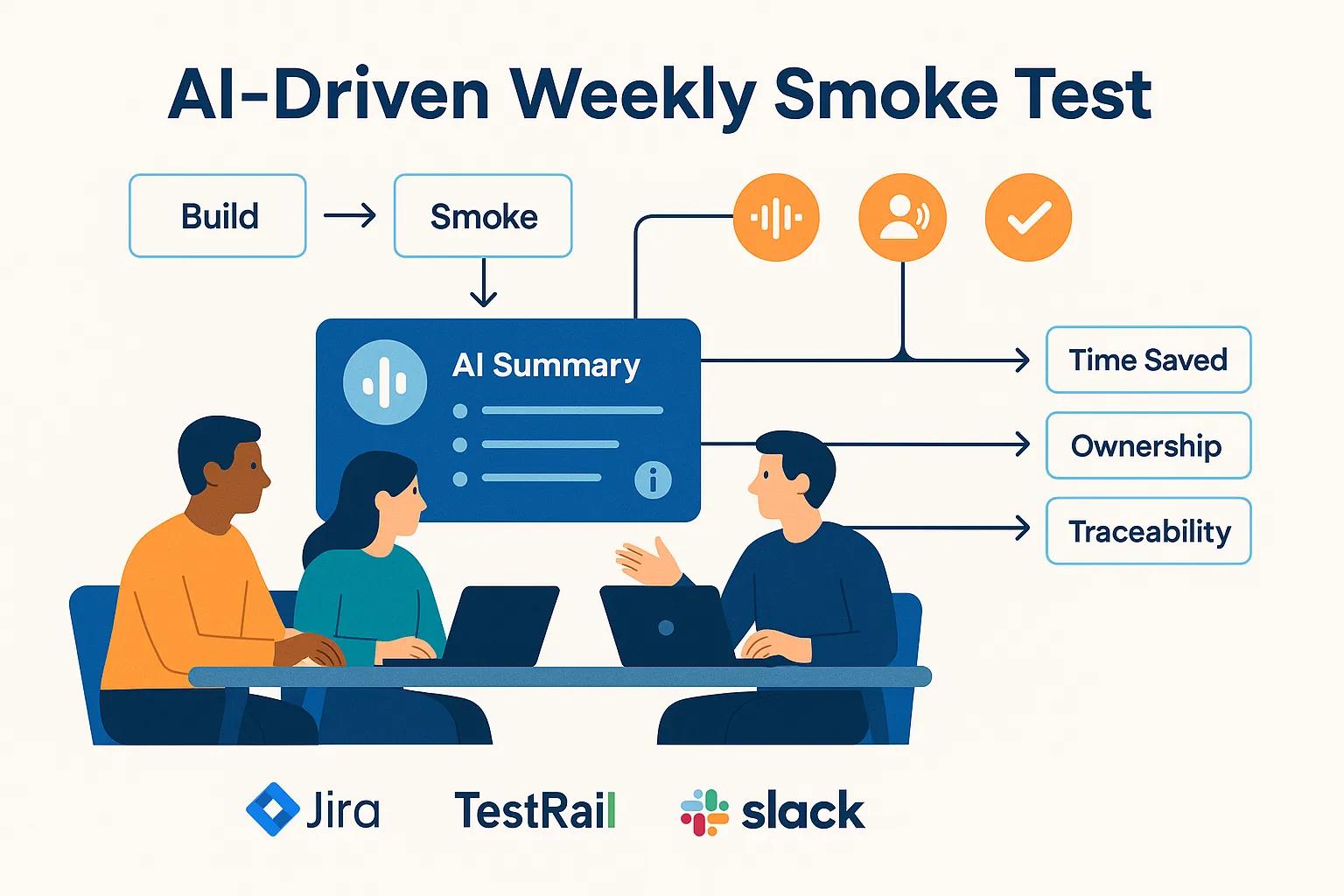
What Are WeeklySmokeTesting Meetings and Why Are They Critical for QA?
Weeklysmoketesting meetings are brief, recurring check-ins where teams confirm that a newbuild’s essential functions are working and that no showstopper defects are blockingdevelopment. They act as an early-warning system in the QA lifecycle, catching high-impact regressions before full regression or UAT cycles begin, and establish a predictable rhythm for triaging and assigning remediation tasks. Sincesmoketests focus on core functionality, the meeting typically results in a short list of verified passes/fails, decisions on blocking issues, and assigned remediation items. However, inconsistent note-taking or unclear ownership often diminishes the meeting’s impact. Therefore, clarity of discussion and traceability of decisions are paramount, directly leading into howsmoketests integrate with broader QA and sprint planning, and why standardizing meeting outputs is essential for reliable follow-up.
How Do WeeklySmokeTests Fit intoSoftware QualityAssurance?
Weeklysmoketests serve as a first-pass validation within iterative QA workflows, acting as a subset of broader regression and UAT activities specifically designed to quickly identify blocking defects.
Within a typical sprint timeline,smoketesting occurs shortly after abuildis created or a nightly deployment is completed, giving QA engineers and dev leads an initial signal about release readiness. By catching critical issues early,smoketests prevent wasted effort later in regression cycles and maintain momentum in continuous delivery pipelines. This strategic placement shortens defect discovery time and clarifies triage priorities. Understanding this timing helps teams select the right attendees—QA engineer, dev lead, product owner—and ensures the meeting yields the precise outputs needed for subsequentautomation.
What Challenges Do QA Teams Face During WeeklySmokeTest Reviews?

QA teams frequently grapple with documentation gaps, inconsistent note-taking, and lost decisions, leading to follow-up ambiguity and repeated context-switching for engineers. Missed action items and unclear ownership are common when meetings rely on manual notes or when the facilitator changes weekly, increasing the time needed to reproduce issues and delaying remediation. Teams also struggle to maintain searchable historical records for recurring issues, making trend identification and regression planning more difficult across sprints. These pain points highlight a clear need forautomatedcapture, standardized summaries, and reliable traceability from discussion to ticket creation—precisely where AI-assisted meeting tools can bridge the gap between conversation and actionable outcomes.
With these QA meeting needs clarified, it’s beneficial to consider AI meeting assistants capable of reliably transcribing and summarizing discussions. A prime example is Fireflies.ai, an AI meeting assistant that transcribes meetings, generates comprehensive summaries and action items, and maintains a searchable meeting history. Fireflies.ai positions itself as aproductivityenhancer for teams navigating hecticsmoketest cycles, offeringautomatednote-taking, speaker recognition, and integration options that feed meeting outputs directly into task trackers. This product-aligned capability demonstrates how an AI assistant can transform fleeting meeting discussions into assignable work items and searchable artifacts without adding manual overhead. With that context, let’s explore exactly how AI automates summary creation and lightens the load on QA teams duringsmoketest reviews.
How Can AI AutomateSmokeTest Review Summaries and Boost QA Meeting Efficiency?
AI automatessmoketest review summaries by transcribing conversations in near real-time, extracting key highlights and action items, and producing concise meeting summaries that capture decisions and ownership. This process tackles three common efficiency bottlenecks: converting spoken triage into documented tickets, reducing manual note-taking time, and creating a searchable history for trend analysis—all of which decrease follow-up delays and error rates. Because these AI features directly align with QA workflows, teams achieve faster issue resolution and a clearer audit trail without sacrificing meeting brevity or focus.
The following table offers a concise overview of typical meeting tasks, the AI features that address them, and the resulting efficiency gains. This is designed to help QA leads justifyautomationbased on tangible efficiency improvements and to plan integration triggers for ticket creation.
Meeting Task | AI Feature | Efficiency Gain / Error Reduction |
Capture verbal triage notes | Accurate transcription & timestamps | Eliminates manual note gaps; reduces misreported details |
Assign ownership from discussion | Speaker recognition + action-item extraction | Clear accountability; fewer missed tasks |
Locate past occurrences of an issue | Searchable meeting history & tags | Faster root-cause research; reduced duplicate investigation |
Create follow-up tickets | Auto-extraction + integration triggers | Reduced time-to-ticket; faster remediation cycles |
This mapping illustrates howautomatedtranscription and action-item extraction transform meeting artifacts into traceable outcomes, directly reducing manual handoffs and improving team throughput. Next, we’ll examine which AI features are particularly suited forsmoketest meetings and how they address specific QA pain points.
What Features Make AI Meeting Assistants Ideal forSmokeTest Meetings?
Key AI meeting features forsmoketest meetings include high-accuracy transcription, speaker diarization, highlight extraction, timestamping, and automatic action-item detection—each addressing a specific QA pain point. Accurate transcription ensures that test outcomes and observed defects are recorded verbatim, minimizing misunderstandings when engineers later reproduce issues. Speaker labels map statements to individuals, establishing clear ownership of action items and reducing ambiguity during ticket assignment. Highlights and timestamps allow users to quickly jump to the exact moment afailurewas reported in recordings. Collectively, these features significantly reduce the gap between what was discussed in the meeting and the artifacts used for remediation.
Thedevelopmentof AI assistants tailored for QA tasks, leveraging natural language processing to automate and optimize processes, represents a revolutionary leap in testing. These systems aim to provide comprehensive support, minimizing search time and boosting user engagement by answering queries and offering contextual recommendations.
AI Assistant for QA: Automating and Optimizing ProcessesThis study details the development of an artificial intelligence (AI) assistant specifically for quality assurance (QA) tasks, addressing the software industry's growing need for enhanced QA solutions. Traditional QA methods are labor-intensive and susceptible to human error, even when functioning optimally. By harnessing the latest advancements in natural language processing and AI, this assistant maximizes output and reliability through process automation and optimization. Utilizing Rasa technology, the AI assistant aims to transform QA by offering testers comprehensive support, including question-answering, contextual recommendations, and expanding knowledge bases. It can respond to queries using both text and images, thereby minimizing search time and increasing user engagement.
How Does Automating Meeting Notes Save Time and Reduce Errors in QA?
Automating meeting notes eliminates the need for a dedicated scribe, allowing all participants to concentrate fully on triage and technical discussions. This typically reduces the combined time spent on meeting preparation and follow-up. For instance, saving even 20 minutes per meeting that was previously spent drafting notes and converting them into tickets can be reinvested intotest automationor bug fixes—a cumulatively significant gain across sprints.Automationalso minimizes transcription errors and missed context that lead to rework; precise timestamps and searchable transcripts mean developers spend less time trying to recall steps from memory. The reduction in manual handoffs and clearer assignment of ownership shortens the mean time to resolution and enhances the reliability of test cycle documentation.
How to Use Fireflies.ai for Transcribing and Summarizing Weekly QA Standup andSmokeTest Meetings?

Setting up an AI meeting assistant for recurring QA meetings follows a straightforward Before/During/After pattern, ensuring that meetings generate usable artifacts for follow-up. Before the meeting, integrate the assistant with your calendar and conferencing tools, and configure permissions so it can join recurring meetings and capture audio with consent. During the meeting, let the assistant run unobtrusively to transcribe, label speakers, and flag potential action items in real time while participants focus on technical discussion. After the meeting, review the generated summary, confirm or edit extracted action items, and use integrations to push tickets into your tracking systems for structured follow-up.
Here’s a recommended checklist to prepare recurringsmoketest meetings forautomatedcapture, ensuring consistent data collection and privacy compliance across the team.
Connect the meeting assistant to your team calendar and conferencing platform, granting the necessary permissions.
Schedule the assistant to join recurringsmoketest meetings and confirm participant consent before recording begins.
Define meeting tags and templates (e.g., "smoke-test," "build-1234") to standardize summaries and downstream ticketing.
This checklist helps QA teams avoid common setup pitfalls and ensures each meeting produces standardized artifacts for later review and integration. The following section details specific setup steps and recommended settings for a product example.
How to Set Up Fireflies.ai for Recurring WeeklySmokeTest Meetings?
To set up Fireflies.ai for recurringsmoketest meetings, connect your calendar and conferencing integrations and invite the assistant to the recurring event so it can join automatically and capture the session. Configure the assistant’s privacy settings and recording consent according to your organization’s policies. Create meeting templates or tags (e.g., for environment,build, and testscope) to ensure consistently structured summaries. Set speaker recognition and keywords to highlight key QA terms like “blocking,” “regression,” and “reproduce steps” so the assistant can surface critical moments effectively. Finally, map action-item extraction to your issue-tracker workflow, enabling reviewed items to be pushed into tickets with the correct fields.
The ability to extract specific information from meeting transcripts, such as questions and their corresponding answers, represents a significant advancement for understanding meeting content and building interactive interfaces. This capability transforms lengthy discussions into accessible question-and-answer formats.
MeetingQA: Extractive QA from Meeting TranscriptsGiven the widespread use of online meeting platforms and robust automatic speech recognition systems, meeting transcripts have become a promising area for natural language processing tasks. Most recent research on meeting transcripts focuses primarily on summarization and action item extraction. However, meeting discussions also contain a valuable question-answering (QA) component, crucial for understanding discourse or meeting content, and can be used to build interactive interfaces on top of long transcripts. Therefore, this work leverages this inherent QA component of meeting discussions and introduces MeetingQA, an extractive QA dataset comprising questions asked by participants and their corresponding responses. Consequently, questions can be open-ended and actively solicit discussion, while answers may be multi-span and distributed across multiple speakers.
How Does Fireflies.ai Capture and Analyze QA Discussions During Meetings?
During capture, Fireflies.ai employs high-accuracy transcription and speaker diarization to generate a timestamped transcript and highlight moments where key phrases or issue discussions occur. The assistant tags keywords and extracts potential action items and decisions, making them easy to review and convert into tracked tasks. Analytics on recurring keywords and issue types help QA leads identify persistent problems across builds and pinpoint areas where test coverage orautomationneeds strengthening. This captured data creates a searchable meeting history that reduces the time engineers spend locating prior context and supports more informed triage.
How to Leverage AI-Generated Summaries and Action Items After QA Meetings?
Following asmoketest meeting, review and refine the AI-generated summary and candidate action items. Clarify ticket titles, reproduction steps, severity, and assignment before exporting them into your tracker. Utilize integrations to push finalized action items into Jira or TestRail, complete with links to the transcript timestamp and highlight, allowing engineers to jump directly to the relevant discussion segment. Maintain a searchable QA meeting history to track recurring regressions and provide context during regression planning and retrospectives. This post-meeting discipline of quick review and export is crucial: it transforms conversational outcomes into measurable work items, closing the loop on issue resolution.
To efficiently transition from summary to tracked work, adopt a brief review workflow where a QA lead approves or edits items within 24 hours, then triggers ticket creation and notifies assignees. This practice reinforces ownership and minimizes follow-up delays.
What Are the Key Benefits of Using AI Meeting Assistants for WeeklySmokeTesting?
AI meeting assistants deliver faster issue detection, clearer ownership, and a centralized, auditable record of decisions and action items, significantly boosting QA meetingproductivityand test cycle documentation. These benefits translate into measurable outcomes such as reduced meeting follow-up time, fewer missed action items, and a searchable archive that accelerates the diagnosis of recurring issues. The table below maps benefits to how AI delivers them and the practical outcomes QA teams can expect, helping to quantify the value of adoptingautomatedmeeting capture.
Benefit | How AI Delivers It | Practical Outcome |
Time saved on notes | Automated transcription and summaries | QA and dev teams reclaim meeting preparation and follow-up time |
Clear ownership | Speaker labels + action-item extraction | Reduced ambiguity; higher task completion rates |
Traceability | Searchable meeting history + timestamps | Faster root-cause analysis and audit trails |
Consistent documentation | Template-based summaries and tagging | Easier trend analysis across smoke test cycles |
These mapped outcomes clearly demonstrate that AI reduces the cognitive load on teams and establishes a consistent record for future planning. The next two subsections delve deeper into collaboration and faster issue resolution.
How Does AI Improve Collaboration and Decision-Making in QA Teams?
AI-generated transcripts and summaries provide a shared reference point that aligns product,engineering, and QA around the same factual basis, reducing miscommunication and accelerating consensus. When all stakeholders can reference the same timestamped excerpt, decisions become evidence-based, relying less on memory or subjective recollection. Shared artifacts also enable asynchronous collaboration: stakeholders who miss a meeting can catch up quickly and take action without lengthy follow-ups. This shared context shortens review cycles and enhances the speed and quality of cross-functional decisions.
These collaborative improvements directly support the faster remediation workflows that teams need to maintain release schedules.
How Does AI Support Faster Issue Resolution and Test Cycle Documentation?
AI accelerates resolution by automatically surfacing action items with tentative severity and suggested owners, enabling teams to rapidly convert verbal assignments into tracked tickets. The transcript-to-ticket linkage preserves the exact reproduction details discussed in the meeting, reducing the time engineers need to reproduce issues and begin fixes. Over time, searchable meeting archives reveal recurring patterns and regression origins, which improve test coverage and minimize duplicate investigations. This traceability also strengthens auditability for compliance or post-release analysis.
The combination of swift ticket creation, clearer reproduction context, and historical traceability yields tangible reductions in time-to-fix and enhances long-term test planning.
Which Integrations Enhance Fireflies.ai’s Role in QA Workflows andSmokeTest Reviews?
Integrations connect meeting artifacts to the tools QA teams use daily, transforming summaries and action items into tracked work without manual copying. Integrations with issue trackers, test management tools, and team messaging platforms enable automatic ticket creation, export of transcripts totest cases, and immediate distribution of summaries to relevant channels for quick visibility.
The table below outlines common integrations, what they sync, and how QA teams typically leverage that data, providing a practical playbook for implementingautomation.
Integration | What It Syncs | Typical QA Use-Case |
Jira | Action items, ticket fields, transcript links | Auto-create bug tickets with reproduction details and assignee |
TestRail | Test notes, test case links, summaries | Attach meeting context to test cases and test runs |
Slack | Meeting summary snippets, alerts | Post critical failures to triage channels for rapid response |
This EAV-style mapping demonstrates how integrations expand the utility of meeting outputs and reduce manual transfer steps. The following H3s detail how common QA tools pair with meeting artifacts.
How Does Fireflies.ai Integrate with Jira and TestRail for QA Task Management?
Fireflies.ai can map extracted action items and summary fields to ticket templates, so when a QA lead approves items, tickets are created in Jira with titles, descriptions, reproduction steps, severity, and a link to the transcript. For TestRail, meeting summaries and notes can be linked to relevanttest casesor test runs, providing contextual evidence for failures observed duringsmoketests. These integrations maintain traceability between discussion, evidence, and tracked remediation, making it simple to locate the meeting moment that generated a ticket. Automating these flows reduces manual entry errors and shortens the time between detection and assignment.
Theseautomatedmappings ensure that meeting outputs become first-class artifacts within your QA toolchain, rather than ephemeral notes.
How Can Slack and Other Communication Tools Work with Fireflies.ai for QA Teams?
Slack and similar messaging platforms can receive summarized meeting snippets, critical issue alerts, and links to transcripts, keeping the wider team informed without requiring everyone to attend the meeting. Sending concise, tagged summaries into a triage channel enables rapid attention from on-call engineers or product owners and creates a persistent channel-level archive. Alerts triggered by keywords like “blocking” or “production” prompt immediate notifications, accelerating response for high-severity items. This approach reduces email clutter and centralizes visibility for time-sensitive QA outcomes.
Routing summaries and alerts into communication channels completes the loop from conversation to action, enabling faster, coordinated remediation across teams.
What Are Real-World Examples of AI Improving WeeklySmokeTesting Meetings?
Teams that adopt AI meeting assistants consistently report measurable reductions in follow-up time, higher action-item completion rates, and improved historical traceability for recurring defects. For example, organizations usingautomatedmeeting capture have documented substantial aggregate time savings by eliminating manual note conversion and accelerating ticket creation. Industry-reported metrics show millions of meeting minutes processed and significant time reclaimed across user bases. These real-world outcomes stem from converting conversational decisions into tracked work with minimal human overhead.
The integration of AI into meeting search capabilities significantly enhances information retrieval, offering a more accurate and fasterexperiencecompared to traditional methods. This AI-powered approach not only improves efficiency but also boosts user satisfaction by quickly pinpointing relevant material.
AI-Powered Meeting Search: Enhancing Information RetrievalThis study compares traditional search methods—navigating video recordings by scrubbing back and forth or keyword searching transcripts—with integrated AI video and transcript search. Based on preliminary test results, human-centric design features were incorporated into the AI, leading to the development of a new, enhanced AI search tool for information retrieval. The search technique efficiency testing involved two sets of experiments. The initial results indicated that AI-based search algorithms were more accurate and faster than conventional search approaches. Participants also expressed greater satisfaction with the AI-powered search experience, praising the system’s ability to quickly find relevant material and make targeted recommendations.
How Have QA Teams Reduced Meeting Follow-Up Time Using Fireflies.ai?
When teams replace manual note-taking withautomatedtranscription and summary workflows, typical follow-up tasks—creating tickets, assigning owners, and compiling reproduction steps—shrink from many tens of minutes to just a few minutes of review and approval. This reduction scales across sprints: at an aggregate level,automatedcapture frees up QA andengineeringtime previously spent on administrative tasks, allowing it to be redeployed toautomationor debugging. Industry-scale processing numbers underscore the practicality ofautomation. For teams considering adoption, the key metric is the reduced mean time to ticket creation, which directly accelerates remediation. Faster follow-up also diminishes the backlog of untriaged items, keepingsmoketest cycles leaner and more predictable.
These operational improvements help teams maintain sprint velocity and reduce firefighting overhead during release windows.
What Success Stories Demonstrate Improved Action Item Completion in QA Reviews?
Success stories typically highlight clearer ownership and higher completion rates once action items are extracted, labeled with speaker names, and pushed into trackers with deadlines and context. Speaker-labeled action items ensure that the engineer assigned a task is clearly identifiable in both the transcript and the ticket, reducing misunderstandings and duplicate ownership. Furthermore, searchable archives and trend analytics help teams identify recurring fixes that warrant permanent test coverage, improving action-item closure rates over time. For teams exploring AI meeting assistants, these patterns illustrate a measurable path from chaotic, hecticsmokecycles to structured, auditable QA processes that maintain momentum across sprints.
For teams ready to trial this approach, Fireflies.ai offersautomatednote-taking, comprehensive summaries, action-item extraction, speaker recognition, and integrations with common QA tools, all backed by enterprise-gradesecurity. A free trial or paid subscription path is available to evaluate its fit. Fireflies.ai has processed vast volumes of meeting minutes and deliveredproductivitygains for numerous users, positioning it as a practical choice for teams aiming to streamline weeklysmoketest reviews and reduce the overhead of manual meeting artifacts. If you're looking to quickly convert yoursmoketest conversations into tracked outcomes, consider evaluating an AI meeting assistant with robust transcription, summarization, action-item workflows, and integrations tailored to your ticketing and communication tools.
Frequently Asked Questions
What role does AI play in enhancing communication duringsmoketesting meetings?
AI enhances communication insmoketesting meetings by providing accurate transcriptions and summaries that all participants can reference. This shared documentation minimizes misunderstandings and ensures everyone is aligned on decisions made during the meeting. By capturing key discussions and action items, AI tools facilitate asynchronous collaboration, allowing team members who missed the meeting to catch up quickly. This clarity fosters a more cohesive team environment, ultimately leading to faster decision-making and improved project outcomes.
How can AI meeting assistants aid in historical data analysis for QA?
AI meeting assistants create searchable archives of meeting transcripts and summaries, which are invaluable for historical data analysis in QA. By tagging and organizing discussions around specific issues, teams can easily identify recurring problems and trends over time. This capability allows QA teams to conduct root-cause analysis more efficiently, improving their ability to address persistent defects. Furthermore, a well-documented history supports better regression planning and enhances overall test coverage by highlighting areas needing attention.
What are the potential cost savings associated with using AI in QA meetings?
Implementing AI in QA meetings can lead to significant cost savings by reducing the time spent on manual note-taking and ticket creation. Teams can save hours each week that would otherwise be dedicated to administrative tasks, allowing them to focus on more critical activities liketest automationand bug fixing. Over time, these savings accumulate, driving improvedproductivityand efficiency across sprints. Additionally, faster issue resolution can reduce the costs associated with product release delays, further enhancing the return on investment.
How does AI improve the accuracy of action item assignments in QA meetings?
AI enhances the accuracy of action item assignments by utilizing speaker recognition and context extraction during meetings. This technology ensures that action items are clearly linked to the individuals responsible for them, reducing ambiguity and the risk of missed tasks. By automatically tagging action items with the speaker's name and relevant details, AI tools help maintain accountability and streamline follow-up processes. This clarity not only boosts task completion rates but also cultivates a culture of responsibility within the QA team.
Can AI meeting assistants integrate with existing QA tools?
Yes, AI meeting assistants can seamlessly integrate with existing QA tools such as Jira, TestRail, and Slack. These integrations enable automatic ticket creation, linking meeting summaries totest cases, and distributing critical updates to team communication channels. By connecting meeting outputs directly to the tools teams already use, AI assistants enhance workflow efficiency and reduce the need for manual data entry. This integration ensures all relevant information is readily accessible, facilitating quicker responses to issues and improving overall project management.
What are the best practices for implementing AI insmoketesting meetings?
Best practices for implementing AI insmoketesting meetings include setting clear objectives forautomation, ensuring proper integration with existing tools, and training team members on how to effectively utilize AI features. It's essential to establish a consistent meeting structure and tagging system to enhance the quality of captured data. Regularly reviewing AI-generated summaries and action items can also help maintain accountability and refine follow-up processes. By fostering a culture of collaboration and continuous improvement, teams can maximize the benefits of AI in their QA workflows.
Conclusion
Integrating AI meeting assistants into weeklysmoketesting meetings significantly boosts QA team efficiency by automating note-taking, clarifying action items, and providing searchable meeting histories. These tools not only streamline documentation but also foster better collaboration and faster issue resolution, ultimately leading to more productive testing cycles. By adopting AI solutions like Fireflies.ai, teams can transform chaotic meetings into structured processes that support continuous delivery. Discover how these innovations can elevate your QA workflows by exploring our recommended AI tools today.

Comments